Hello Fellow Fabricators 👋 — this is my first Microsoft Fabric post, and honestly I didn't plan for it to be a debugging story. But here we are.
I've been putting OneLake security through its paces as part of a bigger piece of work: figuring out where row-level security actually belongs in an enterprise data engineering architecture. Not "does the feature exist" — it does — but "does it survive contact with the way engineers really build pipelines?"
Spoiler: mostly yes. With one rather specific exception that cost me an afternoon and taught me more about Fabric Spark internals than I expected.
TL;DR A OneLake RLS-secured Lakehouse table joined to a normal Delta table fails when I use the PySpark DataFrame API, but the logically identical Spark SQL join works fine. RLS itself is enforcing correctly in both cases. I've raised it with Microsoft and I'll update this post when I know more.
What I was actually trying to do
The basic requirement was simple:
- keep one shared Lakehouse table in secured data workspace;
- apply country-based OneLake RLS;
- let an engineer work only with the rows they're entitled to from a dedicated code workspace accessing Lakehouse through item-level permissions;
- let them keep using normal Spark engineering patterns on the filtered data.
That last bullet is the one that matters, and it's the one that's where the rest of the article expands on challenges I faced
For Reference here is how the architecture would look like:
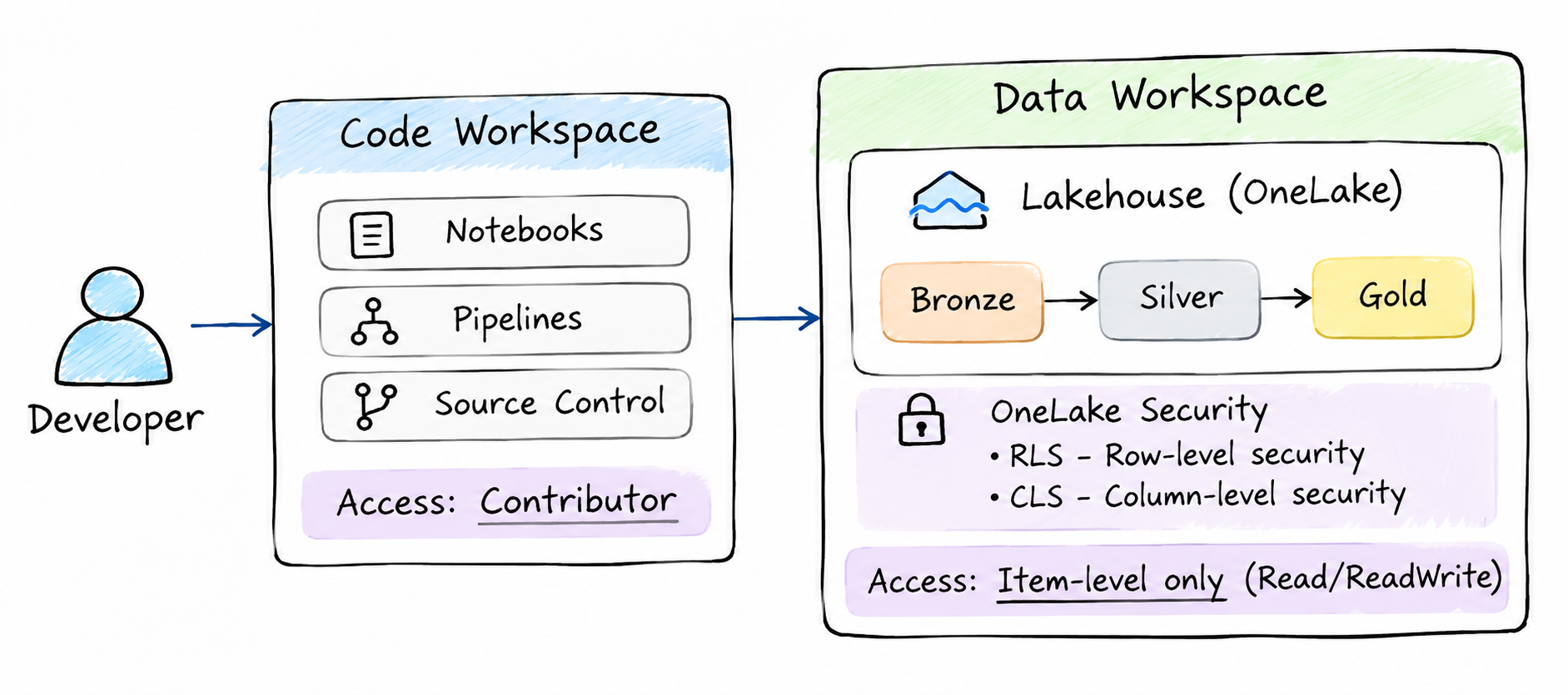
The first three worked exactly as advertised. Then I joined the secured table to an ordinary Delta lookup table using the DataFrame API, and things got interesting.
The test setup
Nothing exotic — a small synthetic People dataset.
The secured table:
dbo.employee
with fields such as:
employee_key
employee_name
country_code
department_key
job_title
job_grade
employment_status
A OneLake security role restricted employee rows by country_code.
The lookup table:
dbo.department
containing:
department_key
department_name
business_unit
No RLS on dbo.department.
One important detail that's easy to trip over: my test user was deliberately not a Workspace Admin, Member or Contributor in the Data Workspace where the lakehouse is. Those roles bypass OneLake RLS/CLS entirely, so if you test as yourself with Admin rights you'll happily conclude everything is fine and prove nothing.
Step 1: RLS worked.
Reading the secured table directly:
employee = spark.table("dbo.employee")

display(employee)
employee.count()
The engineer saw only the rows their OneLake role allowed. Row counts lined up. No complaints.
The department table behaved like any other Delta table:
department = spark.table("dbo.department")

display(department)
Great. Security config correct, confidence high. On to the actual transformation.
Step 2: The PySpark join that didn't
This is about as vanilla as a silver-layer enrichment gets:
from pyspark.sql import functions as F

silver_employee = (
    employee.alias("e")
    .join(
        department.alias("d"),
        F.col("e.department_key")
        == F.col("d.department_key"),
        "left"
    )
    .select(
        "e.*",
        F.col("d.department_name"),
        F.col("d.business_unit")
    )
)
Because Spark is lazy, defining this succeeded and lulled me into a false sense of security (pun fully intended).
Then I triggered an action:
display(silver_employee)
or:
silver_employee.count()
And got:
java.io.NotSerializableException:
org.apache.spark.sql.delta.files.ShallowSnapshotDescriptor
A later run failed differently — inside the OneLake security execution path, with an internal Spark optimization error.
Here's the part that made me stop and stare at the screen: both DataFrames worked perfectly on their own. Read the secured table — fine. Read the lookup table — fine. Join them — boom.
It was the combination that failed.
Step 3: The Workaround: Spark SQL
So I expressed exactly the same logical transformation in SQL:
silver_employee = spark.sql("""
    SELECT
        e.*,
        d.department_name,
        d.business_unit
    FROM dbo.employee e
    LEFT JOIN dbo.department d
        ON e.department_key = d.department_key
""")

display(silver_employee)
This worked. RLS-filtered employee rows, correctly enriched with department attributes. Same logic, same tables, same user, same session — different result.
Which leaves us here:
RLS-secured employee
        +
ordinary department
        |
        |-- PySpark DataFrame join  -> fails
        |
        `-- Spark SQL join          -> works
I'll be honest: "works in SQL, fails in DataFrame" is the kind of inconsistency that makes you re-run everything twice because you assume you've made a typo. I hadn't.
Why this is more than a curiosity
Microsoft's documentation says Spark support for OneLake security covers:
- Spark SQL;
- PySpark/Scala DataFrame APIs;
- joins;
- aggregations;
- downstream transformations.
So this isn't a case of "joins on secured tables aren't supported." They're meant to be.
What the evidence suggests is that the same logical operation is landing on a different execution or optimization path depending on how it's expressed — and something in the DataFrame path isn't playing nicely with the secured relation.
I'm deliberately not calling that a root cause. It's a hypothesis that fits the symptoms. It needs confirmation from Microsoft, and I'd rather publish an honest "I don't know yet" than a confident guess.
What I tried next
My first instinct was join planning, so I went after broadcast joins:
spark.conf.set(
    "spark.sql.autoBroadcastJoinThreshold",
    "-1"
)
Issue remained.
Then Adaptive Query Execution:
spark.conf.set(
Still remained.
Still on my list to work through:
- forcing a sort-merge join;
- repartitioning both DataFrames on the join key;
- projecting a narrower column set before joining;
- diffing the logical and physical plans of the SQL vs DataFrame versions;
- testing a DataFrame → temp view → SQL transition to see exactly where the behaviour flips.
That plan comparison is the one I'm most curious about — it should tell us whether the two paths genuinely diverge or whether something is being serialized differently along the way.
A workaround I actively dislike
You can materialise the small lookup table locally:
department_local = spark.createDataFrame(
    department.collect(),
    schema=department.schema
)
And yes, it still doesn't fix the pyspark serialisation issue. But I'm not going to pretend collect() is an engineering solution. It drags everything through the driver and falls over the moment your "small lookup" turns out to be a large reference data
The fact that Spark SQL works is a far more useful workaround while the DataFrame behaviour is being investigated. It's expressible, reviewable, and doesn't quietly introduce a scalability cliff.
Bonus lesson: OneLake RLS changes how Spark executes
This one was a genuinely useful side discovery.
A secured query doesn't just run inside your normal user Spark context. Fabric spins up a Microsoft-managed security context — you can see it in the Monitoring Hub as a SparkSecurityControl job — which applies the effective OneLake security policy before filtered data is handed back to your Spark execution.
That architectural detail matters a lot when you're sizing smaller capacities.
In my testing, an F2 capacity initially struggled to allocate both contexts. Constraining the user Spark pool to a Small, 1–1 node configuration left enough headroom for the security context, and basic RLS-secured queries started running.
Completely separate from the join failure — but if you're prototyping OneLake security on an F2 and getting resource errors before you even get to your query, this is probably why. Worth knowing before you spend an hour blaming your code.
So would I avoid OneLake RLS?
No. And I want to be clear about that, because "I hit a bug" posts have a habit of being read as "don't use the feature."
The RLS policy itself worked. It filtered correctly on direct reads, and it filtered correctly through an equivalent Spark SQL join. The security model did its job.
My conclusion is narrower than a thumbs up or down:
OneLake RLS is viable, but I'd validate the exact Spark engineering patterns a team actually uses before making RLS a default control on engineering-layer tables.
What I've asked Microsoft
I've raised the scenario with Fabric support and I'm after clarification on:
- whether the DataFrame behaviour is a known OneLake Security/Spark issue;
- why the equivalent Spark SQL plan succeeds;
- whether there's a supported Spark configuration or DataFrame pattern that avoids it;
- whether Catalyst optimization, join strategy or secured-relation serialization is involved;
If I get a confirmed root cause or a proper workaround, I'll update this post.
Final takeaway
The most valuable lesson here wasn't technical — it was about where I stopped testing.
It's very easy to validate:
"RLS works."
…tick the box, and move on. For an engineering platform, the better question is:
"Does RLS work with the way engineers actually build transformations?"
In this case the answer is genuinely nuanced:
- the security policy enforces correctly ✅
- Spark SQL joins work ✅
- the equivalent PySpark DataFrame join currently doesn't, in my test setup ❌
That distinction is the whole gap between a security proof-of-concept and a production engineering platform.
Have you hit this? If you've run OneLake RLS with PySpark DataFrame joins in Fabric — working or broken — I'd really like to hear your approach was and whether you saw the same NotSerializableException. Drop a comment; I'll fold anything useful into the update.
Thanks for reading my first Fabric post 🧵 — more to come as I keep tinkering!.
Comments
Join the discussionNo comments yet. Be the first to comment.